Production2024
Translation Studio
A GenAI-powered localization workflow for adapting marketing content across languages while preserving tone of voice. The experience supports document translation, conversational copy iteration, and larger batch runs inside one assistant.
 Next.js
 MongoDB
 OpenAI
 Redux Toolkit
 Zod
Zod DeepL
DeepL Jira
Jira Figma
FigmaProduct Flow
File Translator
Upload Excel, CSV, Word, PowerPoint, HTML, Markdown, or plain text: each file is parsed into translatable segments keyed by a stable ID, so translations are written back into the original document with its styling, layout, and heading structure intact — one localized file per target language.
Fine-Tuning Process
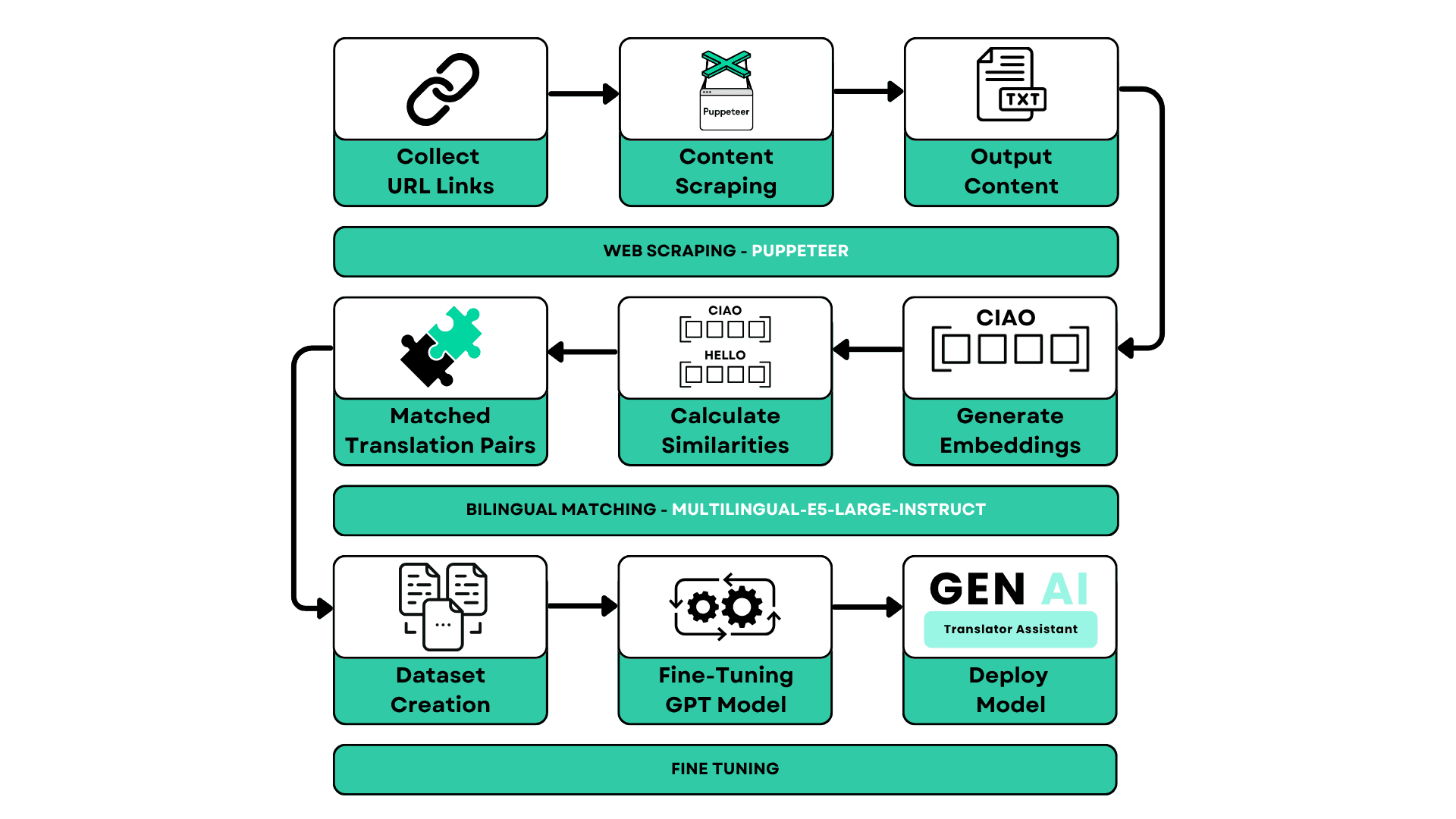
Adapting the model to voice and tone
The process begins by collecting multilingual source material from live pages, then using bitext mining to match bilingual content through embeddings and similarity checks with `multilingual-e5-large-instruct`. That curated dataset is used to fine-tune the model, so the assistant produces translations that hold tone, terminology, and writing style closer to the source brand and need far less cleanup during review.
The Studio Rebuild
In 2026, designed and rebuilt the platform solo, end to end: renamed to Translation Studio, rebuilt the UI and role-based access system from scratch (login, password recovery, admin and manager dashboards, per-user brand permissions), and shipped three capabilities that took it well beyond a chat-and-file translator.
Translate Without Leaving the Design
The plugin replaces the browser tab entirely
An internal Figma plugin translates the current selection in place: it discovers text layers, sends each one's frame context and layout constraints, and returns structured translations keyed by stable node ID rather than array position.
Measure, Don't Trust
A generate-measure-refine loop before anything ships
The plugin never trusts character count or the model's own claim that a translation fits. It loads the real fonts, builds a temporary off-canvas measurement clone, and compares against the actual width/height budget — retrying with overflow feedback up to twice before marking a cell Fits, Tight, or Overflow.
A Scoped, Revocable Token
The plugin never sees a credential
Signing in opens the existing web app's login in a real browser tab; approval hands the plugin a scoped, revocable token over a one-time key exchange. No email/password form, no cookie reuse, and no service secret ever ships inside the plugin bundle.
Bring Your Own Source, Then Approve
Read-only imports, then a real review gate
Per-user Jira and OneDrive connectors pull source content in read-only, evaluating every asset against that connector's declared capabilities and the shared file-format catalog — unsupported formats and import-incapable sources are rejected with a specific reason rather than failing silently. A structured document workspace and approval UI sit before anything is finalized, so a translated file is reviewed, not just exported.
User Management & the Brand Hub
The admin layer went well beyond a login screen: real usage visibility, plan-calibrated budgets a manager can request more of, and a brand hub where each brand's own instructions, products, and tone are the actual configuration the AI reads from — not documentation describing it.
Admin & Manager Roles
A dashboard for real usage, not just accounts
An admin view lists every user with total, active, and disabled counts and total token capacity, and creates new users with a role, a plan, and a starting token budget in one step.
Plan-Based Token Budgets
Free and Professional tiers, priced in tokens
Each plan resolves to a token allocation calibrated against real model cost, so a Free account and a Professional account both map to an approximate euro budget instead of an arbitrary request cap.
A Manager Can Ask for More
Cap increases go through a request-and-review flow
Managers request a temporary token-cap increase with a duration and a reason; admins approve or deny it, and the raised cap expires and resets automatically on the next monthly cycle.
One Prompt Per Brand
Brand instructions are the literal system prompt
Each brand's Instructions tab holds the system prompt sent to the model for every translation involving that brand, with a Products tab and a Style & Tone summary read from that same text — and each user carries an allowed-brands list, so access is scoped per person, not account-wide.